
Troubleshooting
Tickets Not Being Generated
- Check that the order reached the status configured in General settings → Generate tickets when order status is.
- Verify the product has “Is it a single giveaway?” checked.
- Check that ticket selling dates allow sales (start date passed, close date not passed).
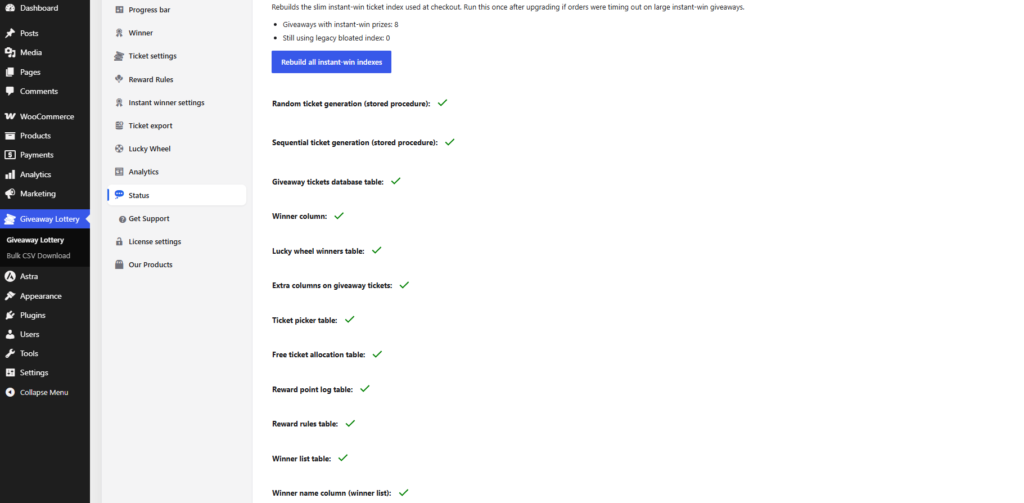
- Go to Status tab and verify database tables exist.
Ticket Emails Not Sending
- Confirm Send tickets by email is enabled in General settings.
- Check your WordPress email setup (consider an SMTP plugin like WP Mail SMTP).
- Verify sender email is valid.
- Check spam/junk folder.
Instant Win Not Working
- Verify Pro license is active.
- Confirm Enable Instant Winner is on in Instant winner settings.
- Check that prizes are configured on the product with valid ticket numbers.
- Go to Status tab → click Rebuild all instant-win indexes.
Lucky Wheel Not Showing
- Check display settings (cart, checkout, thank you, or shortcode page).
- If using shortcode, confirm
[wcs_lucky_wheel]is on a published page. - Clear any caching plugin cache.
- Check that wheel slices are configured and saved.
Free Campaign Form Not Appearing
- Product price must be exactly $0.
- Instant Checkout must be enabled on the product.
- Pro plugin must be installed with active license.
Winner Reveal Page Blank
- Ensure the page contains shortcode
[wxg_winner_reveal]. - Select the correct page in Winner settings.
- Verify a product ID is passed (usually via URL parameter from the Winner button).
Database / Status Tab
Go to Giveaway Lottery → Status to check:
- All required database tables are created
- Stored procedures are installed
- Rebuild instant-win indexes if needed