

Viral Share (Social Share)
Viral Share turns social actions into extra lottery entries. Visitors follow your pages, watch a video, answer a poll, or refer a friend — and each completed action awards bonus tickets (and optionally reward points or a product discount) toward your giveaway. It is the fastest way to make a campaign spread on its own.
Requires: WooCommerce and the free Giveaway Lottery plugin. Reward points rewards require Giveaway Lottery Pro. No separate license key is needed for this addon.
What Customers Can Do to Earn Entries
Each bonus action can be enabled independently on any giveaway product. Every action can be completed once per logged-in customer, per product.
| Action | What the customer does | Available in |
| Automatic entry | Clicks “Claim tickets” (logs in / registers if needed) | Free & Pro |
| Facebook page visit | Opens your Facebook page in a popup | Free & Pro |
| LinkedIn page visit | Opens your LinkedIn page | Free & Pro |
| Instagram visit | Instagram visit | Free & Pro |
| X (Twitter) follow | Follows your profile (optional username verification) | Free & Pro |
| YouTube — visit channel | Opens your YouTube channel | Free & Pro |
| YouTube — watch video | Watches an embedded video to the end | Free & Pro |
| Email newsletter | Joins with their account email | Free & Pro |
| Refer a friend | Copies their personal referral link | Free & Pro |
| Poll / survey | Answers multiple-choice / text questions | Free & Pro |
| Reward points (with any action) | Points added to their reward balance | Pro |
How It Works
- On a giveaway product you enable any combination of bonus actions and set how many tickets (and optional points) each one awards.
- On the product page (or via shortcode), customers see a “Ways to enter” list.
- When a logged-in customer completes an action, the plugin records it and awards the tickets by creating a zero-cost order behind the scenes, then runs the normal Giveaway Lottery ticket generation.
- Each action can only be claimed once per customer, so entries stay fair.
- Every claim is logged for analytics.
Step-by-Step: Set Up Viral Share
Part A — Enable Bonus Actions on a Giveaway Product
- Go to Products → Edit your giveaway product.
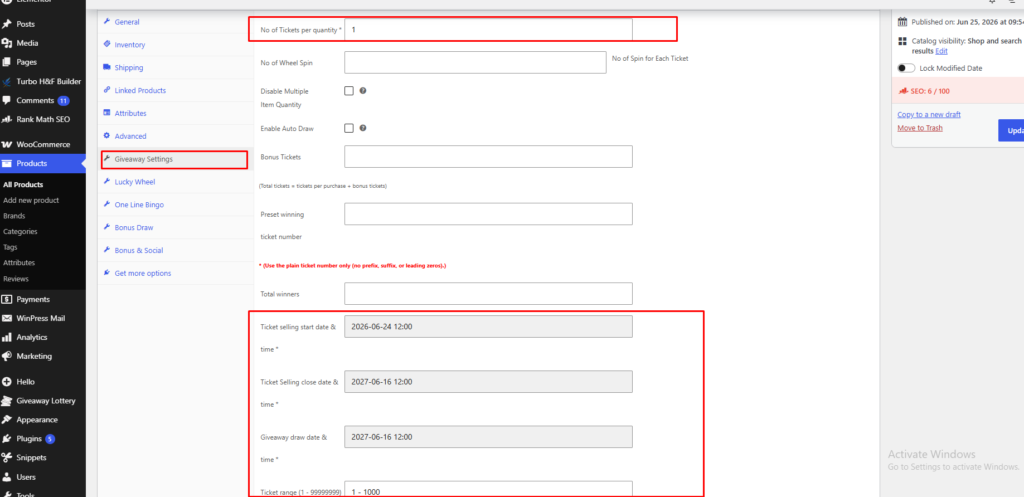
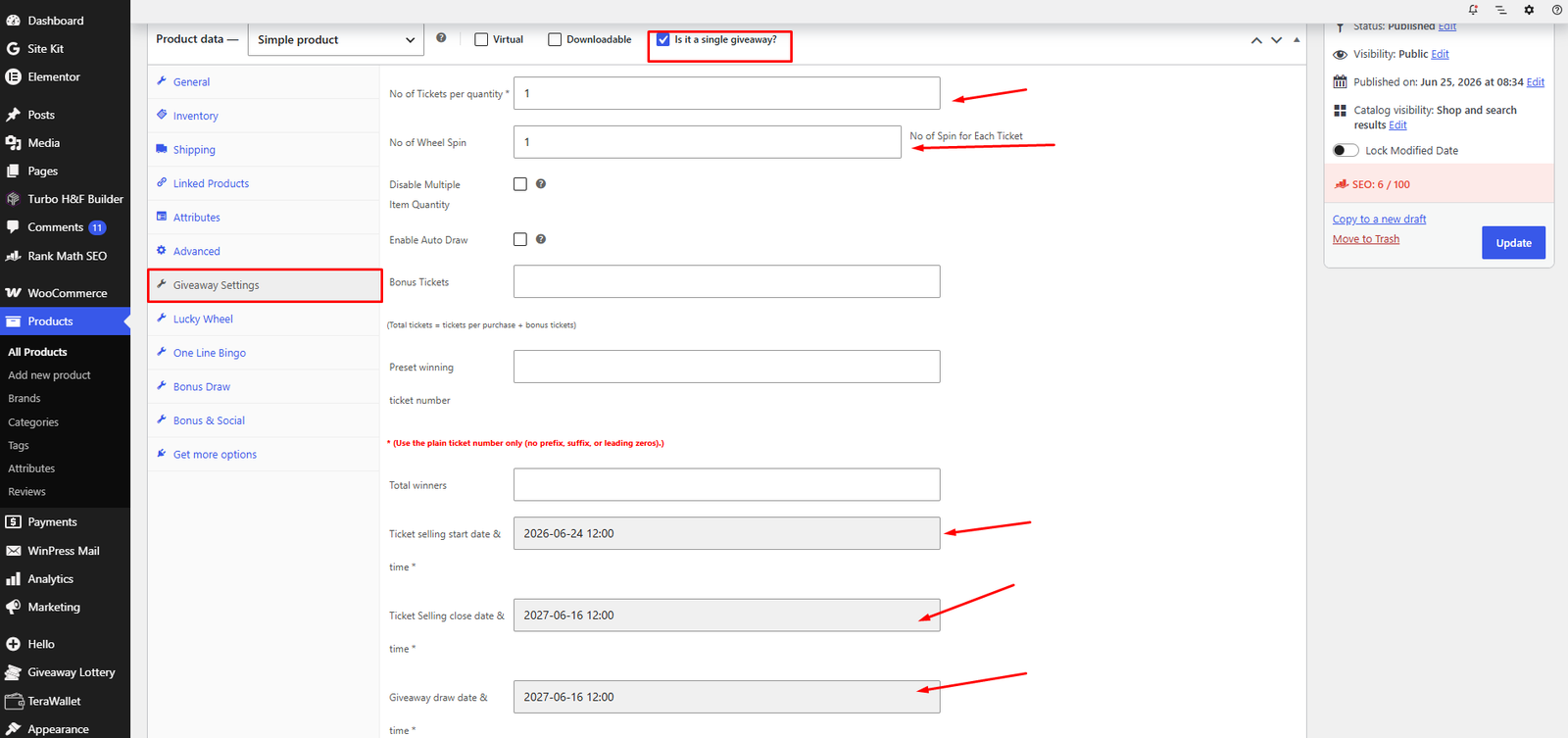
- Set up the giveaway product properly.
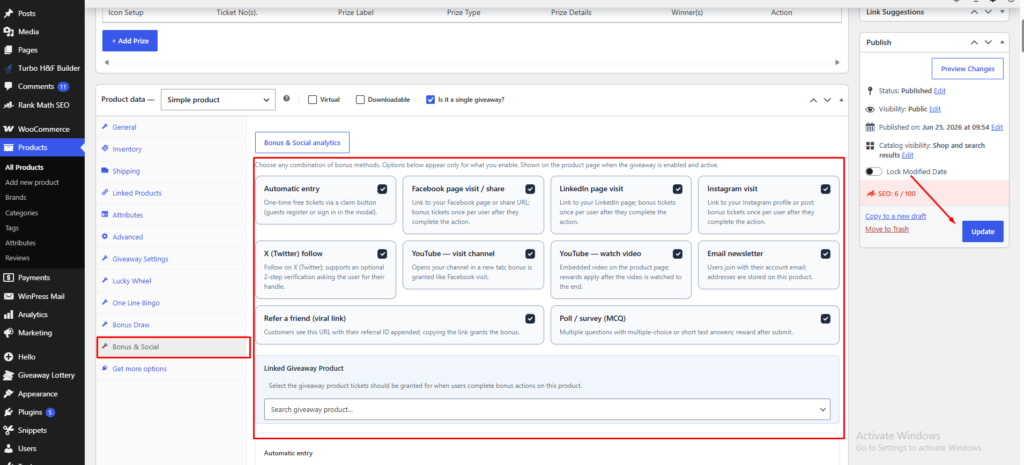
- In the Product data panel, open the Bonus & Social tab.
- Tick the checkbox for each action you want to offer (Automatic entry, Facebook, LinkedIn, Instagram, X (Twitter), YouTube channel, YouTube watch, Email newsletter, Refer a friend, Poll / survey). Only the options you enable will show their settings.
- Click Update to save.
Part B — Configure Each Action
For every enabled action, fill in its fields:
- URL — For social visits (Facebook page URL, LinkedIn page URL, Instagram URL, X profile URL, YouTube channel URL, or the video URL/ID for “watch”).
- Tickets — How many bonus tickets that action awards (e.g.
3). - Reward points (Pro) — Optional points awarded for that action.
- X (Twitter): Require Step 2 username verification — Optional; asks the customer to enter their
@usernameand confirm they followed. - Poll / survey builder — Click + Add question, choose MCQ or Text answer type, add options, and set tickets for completing the poll.


Part C — Optional Customer-Facing Text
Each action has a Customer-facing text (optional) section where you can override:
- Row title — e.g. “Follow us on Instagram”
- Description — Short instruction
- Button label — e.g. “Follow now”
- Discount reward notice — Message shown if a discount is attached

Part D — Optional Product Discount Reward
Each action also has a Product Discount Reward (optional) section so an action can grant a discount as well as (or instead of) tickets:
- Tick Enable product discount for this action.
- Pick the Product, set Quantity and Discount Amount.
- Choose Discount Type — Percent (%) or Fixed Amount.
- A 100% discount creates an automatic free order for the customer.
- A partial discount adds the product to the cart at the discounted price and sends the customer to checkout.

Part E — Link Tickets to Another Giveaway (Optional)
By default, bonus tickets go to the same product the bonus UI is on. To send them to a different giveaway instead:
- In the Bonus & Social tab, use Linked Giveaway Product and search for the target giveaway product.
- Leave it empty to award tickets on the current product.
Part F — Place the Bonus Panel
- The bonus panel automatically appears on the giveaway product page below the add-to-cart area.
- To show it anywhere else, add the shortcode:
[gwss_bonus_entries]To target a specific product from another page, pass its ID:
[gwss_bonus_entries product_id="123"]
Referral Links
- When “Refer a friend” is enabled, each logged-in customer gets a personal link ending in
?gwss_ref={their user ID}. - Set the Referral link base URL to control where the link points (e.g. the giveaway product or your homepage).
- The bonus is awarded when the customer copies their referral link.
What the Customer Sees
- A “Ways to enter” list with a badge on each action (e.g.
+3,+5 pts,50% off, or FREE product). - A live stats strip showing Your entries, Total entries, and Days left (shown when Giveaway Lottery is active).
- A sign-in / register modal for guests so they can log in and claim without leaving the page.
View Viral Share Reports
Go to WooCommerce edit product page → Bonus & Social → Bonus & Social Analytics, choose your Campaign product, and click Load report to see:
- KPI cards: Unique participants, Bonus actions, Tickets granted, Reward points, Free orders (100%), Partial discounts, Newsletter signups.
- Breakdown tables: engagement by action, discount rewards, participants, and recent events.
- An Export CSV button for the participant list.


Pro tip: Give “Automatic entry” a small reward (1 ticket) as an easy first step, then higher rewards for actions that spread your brand — a shared video or a referral link is worth far more than a single sale.