

Bonus Draw
Bonus Draw adds milestone prizes to your raffle. As ticket sales climb toward sellout, the plugin automatically runs extra draws when sales hit the percentages you set (for example 25%, 50%, 75%). It keeps buyers excited throughout the campaign instead of only at the final draw, and it shows a live progress bar on the product page so customers can watch the next bonus draw approach.
Requires: WooCommerce and the free Giveaway Lottery plugin, with the giveaway enabled on the product. Works without Pro; admin notification emails use Pro settings when Pro is installed.
How It Works
- On a giveaway product you define milestones — a Sold %, a Prize label, and how many Winners to draw at each.
- The product page shows a progress bar with a star at each milestone.
- Every time tickets are sold, the plugin recalculates the sold percentage.
- When a milestone percentage is reached, winners are drawn automatically at random from the eligible sold tickets and recorded.
- Winners get an email (optional) and each completed milestone is marked “Draw completed” on the product page.
Step-by-Step: Set Up Bonus Draw
Part A — Configure Global Options
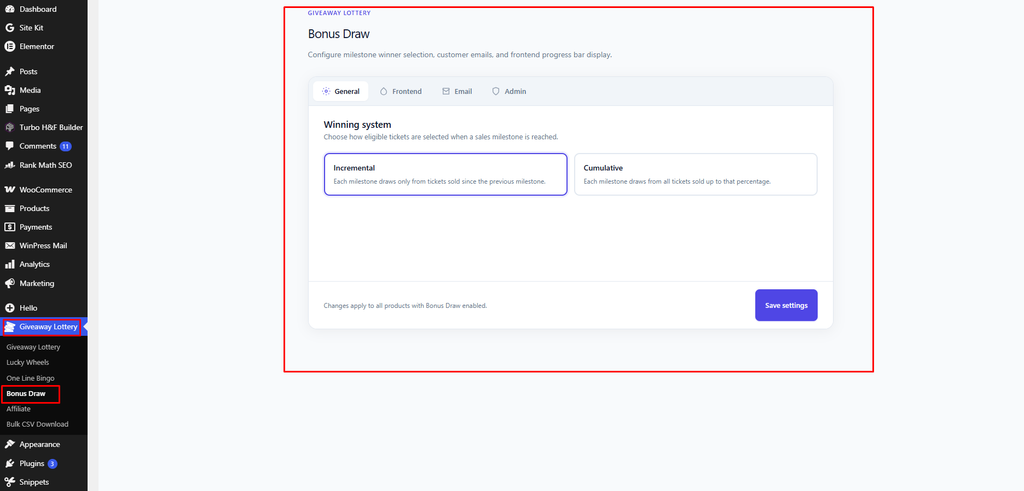
- Go to Giveaway Lottery → Bonus Draw.
- On the General tab, choose the Winning system:
- Incremental (default) — each milestone draws only from tickets sold since the previous milestone.
- Cumulative — each milestone draws from all tickets sold up to that percentage (previous winners excluded).
- On the Frontend tab, customize the product-page display:
- Tab label (default “Bonus Draws”)
- Tab description
- Progress bar color and Progress bar background
- On the Email tab, set up the winner email (see Part C).
- The Admin tab links to core admin-notification settings.
- Click Save settings.
Part B — Add Milestones to a Giveaway Product
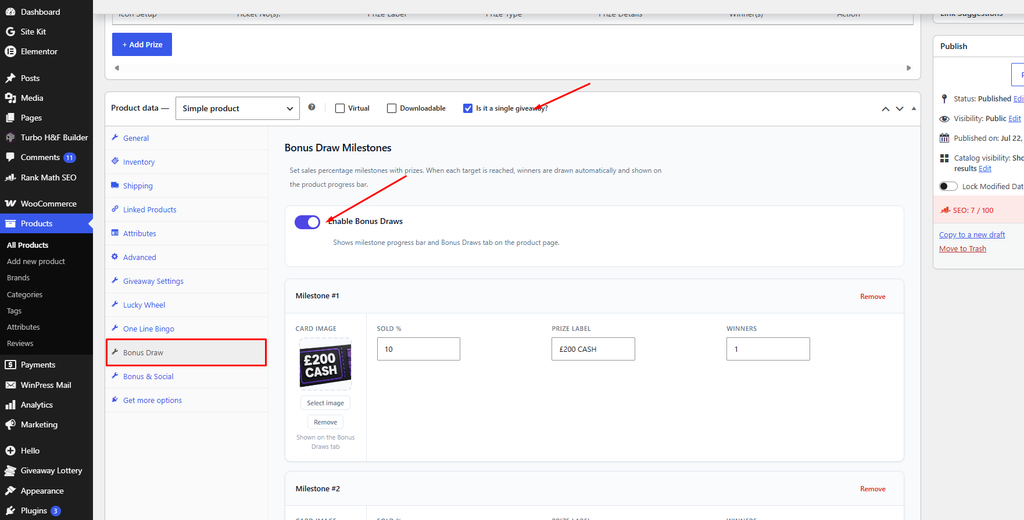
- Go to Products → Edit your giveaway product.
- In the Product data panel, open the Bonus Draw tab.
- Turn on Enable Bonus Draws.
- Click Add Bonus Draw for each milestone and set:
- Card Image — optional image shown on the Bonus Draws tab
- Sold % — the sales percentage that triggers this draw (1–100)
- Prize label — e.g. “£250 CASH”
- Winners — how many tickets to draw
- Add as many milestones as you like; they are sorted by percentage automatically.
- Click Update to save the product.
Part C — Set Up the Winner Email
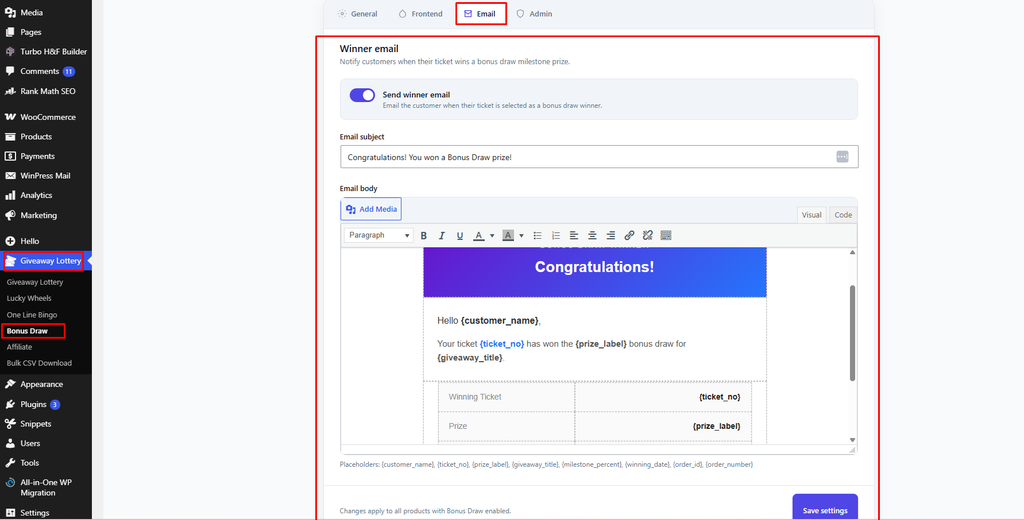
On the Email tab of the Bonus Draw settings:
- Send winner email — toggle on to email the customer when their ticket wins.
- Email subject (default “Congratulations! You won a Bonus Draw prize!”).
- Email body — use placeholders
{customer_name},{ticket_no},{prize_label},{giveaway_title},{milestone_percent},{winning_date},{order_id},{order_number}.
Part D — Display on the Product Page (Optional)
When Bonus Draws are enabled, the milestone progress bar automatically replaces the standard ticket range slider on that product. To place the elements manually elsewhere, use:
[gebd_bonus_progress_bar]
[gebd_bonus_draw_tab]
Both accept an optional product_id attribute.
What the Customer Sees
- A milestone progress bar above Add to Cart with a SOLD bubble and “X% to go until our next bonus draw!”
- Star markers at each milestone, and “Draw completed” once a milestone is reached.
- A Bonus Draws product tab with a prize card for each milestone.
- “All bonus draw milestones have been reached!” once every draw is done.
Prize Fulfillment
Bonus Draw records winners and shows the Prize label for communication, but it does not auto-issue coupons, products, or cash. Fulfill milestone prizes manually and use the winner records to identify recipients.
Where Winners Are Recorded
Bonus draw winners are saved to the Giveaway Lottery winner list (winning type “bonus_draw”, with a note like “30% milestone”) and are reflected in product analytics. There is no separate Bonus Draw report page.
Pro tip: Set your first milestone low (e.g. 10%) so an early bonus draw creates buzz and social proof that encourages more ticket sales toward the next milestone.