

Credit Wallet (TeraWallet)
The Credit Wallet addon lets you pay out prizes as WooCommerce store credit using the free TeraWallet plugin. Once active, “TeraWallet” becomes a selectable prize type on your Lucky Wheel slices and Instant Win prizes — so winners get real balance added to their wallet that they can spend on your store.
Requires: WooCommerce, the free Giveaway Lottery plugin, and the TeraWallet (woo-wallet) plugin. Paying out wallet credit from Instant Win additionally requires Giveaway Lottery Pro. This addon has no settings page of its own — it simply unlocks a prize type inside the wheel and instant-win screens.
Where Wallet Credit Is Paid Out
| Prize source | Supported | When credit is added |
| Site-wide Lucky Wheel | Yes | Immediately when the customer spins and wins |
| Product / order Lucky Wheel | Yes | When the winning spin is processed |
| Lucky Wheel addon (product wheels) | Yes | Via the core wheel win handler |
| Instant Win (Pro) | Yes | Via the core wheel win handler |
| Other mini-games (Bingo, Plinko, etc.) | No | — |
How It Works
- With TeraWallet and this addon active, “TeraWallet” appears as a prize option on Lucky Wheel slices and Instant Win prizes.
- You set the Wallet Amount and a winning description on that prize.
- When a customer wins, the plugin credits their WooCommerce wallet for that amount and records a wallet transaction.
- The winner sees a confirmation message (with the amount) and the credit is immediately usable at checkout.
Step-by-Step: Set Up Wallet Prizes
Part A — Install the Prerequisites
- Install and activate WooCommerce, Giveaway Lottery (and Pro for instant win), and TeraWallet.
- Activate the Giveaway TeraWallet Extension addon.
Part B — Add a Wallet Prize on the Lucky Wheel
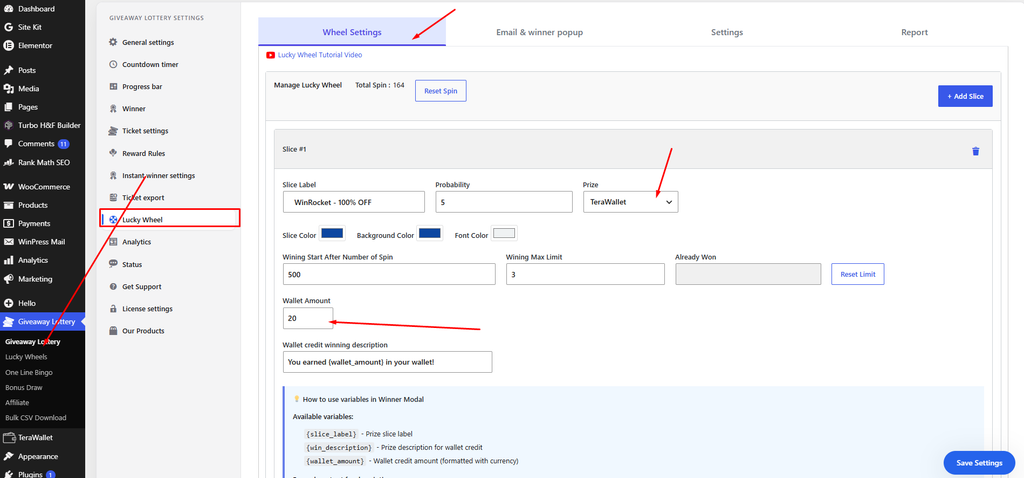
- Go to Giveaway Lottery → Lucky Wheel → Manage Lucky Wheel.
- Add or edit a slice and set its prize type to TeraWallet.
- Enter the Wallet Amount to credit.
- Enter the Wallet credit winning description — use the
{wallet_amount}variable to show the amount (default: “You earned {wallet_amount} in your wallet!”). - Save changes.
If the “TeraWallet” option is greyed out, TeraWallet (or this addon) is not active.
Part C — Add a Wallet Prize on Instant Win (Pro)
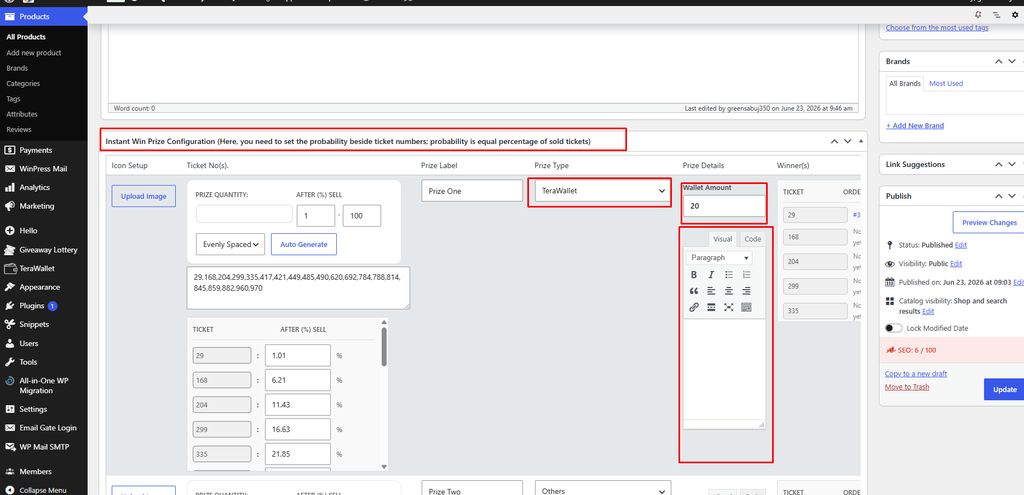
- Go to Products → Edit your giveaway product.
- In the Instant Win Prize Configuration metabox, add a prize and choose prize type TeraWallet.
- Set the Wallet Amount and an optional description.
- Click Update to save the product.
What the Customer Sees
- On the Lucky Wheel, the winning popup shows the wallet amount they earned.
- For Instant Win, the order view shows “Wallet Credit: {amount}” for the prize.
- The credit appears in their WooCommerce wallet balance and can be spent immediately.
Notes
- Instant Win wallet payouts require a logged-in customer — guest orders are skipped.
- Each payout adds a wallet transaction and an order note for your records.
- The addon does not add any admin menu; all configuration happens inside the wheel and instant-win prize screens.
Pro tip: Wallet credit is one of the strongest prize types for repeat business — winners must return to your store to spend it, turning a single giveaway entry into another order.