
Subscription
The Subscription addon connects WooCommerce Subscriptions with Giveaway Lottery so customers who subscribe are automatically entered into your giveaways — on their first payment, on every renewal, and even into new giveaways you launch while their subscription is active. It’s perfect for “membership” style raffles where subscribers earn recurring entries for as long as they stay subscribed
Requires: WooCommerce, the free Giveaway Lottery plugin, and the WooCommerce Subscriptions extension (a paid WooCommerce plugin). The billing interval is controlled by the subscription product itself — this addon only handles ticket allocation.
How It Works
- On each subscription product you set how many tickets a subscriber earns per billing period.
- On each giveaway product you choose which subscriptions are entered, using Include / Exclude Subscriptions (leave Include empty to enter all subscriptions).
- When a customer subscribes and payment completes, tickets are generated for every matching open giveaway.
- On each renewal payment, tickets are generated again (see accumulation below).
- When you publish a new giveaway, all current active subscribers are entered automatically in the background.
- If a subscription is cancelled, expired, or put on hold, tickets for still-open giveaways are withdrawn — and restored if it becomes active again.
Step-by-Step: Set Up Subscription Entries
Part A — Configure a Subscription Product
- Go to Products → Edit your subscription product (Simple or Variable subscription).
- In the Product data panel, find the Giveaway Lottery Subscription fields (on the General tab for simple subscriptions, or per variation for variable ones):
- Allocated Ticket Number — base tickets generated per quantity, per period (default 1).
- Bonus Ticket Number — extra tickets added on top per quantity (default 0). Total per quantity = Allocated + Bonus.
- Accumulation — when enabled, tickets increase each billing period (1st payment ×1, 2nd renewal ×2, and so on).
- Max Cap — optional ceiling on the total tickets per quantity after accumulation (leave empty for no limit).
- Click Update.

Part B — Link Subscriptions to a Giveaway
Linking is done from the giveaway side:
- Go to Products → Edit your giveaway product.
- On the Giveaway Settings tab, below the Ticket range field, set:
- Include Subscriptions — the subscription products whose subscribers are entered. Leave empty to include all subscription products.
- Exclude Subscriptions — subscription products to always keep out (exclude always wins over include).
- Click Update.
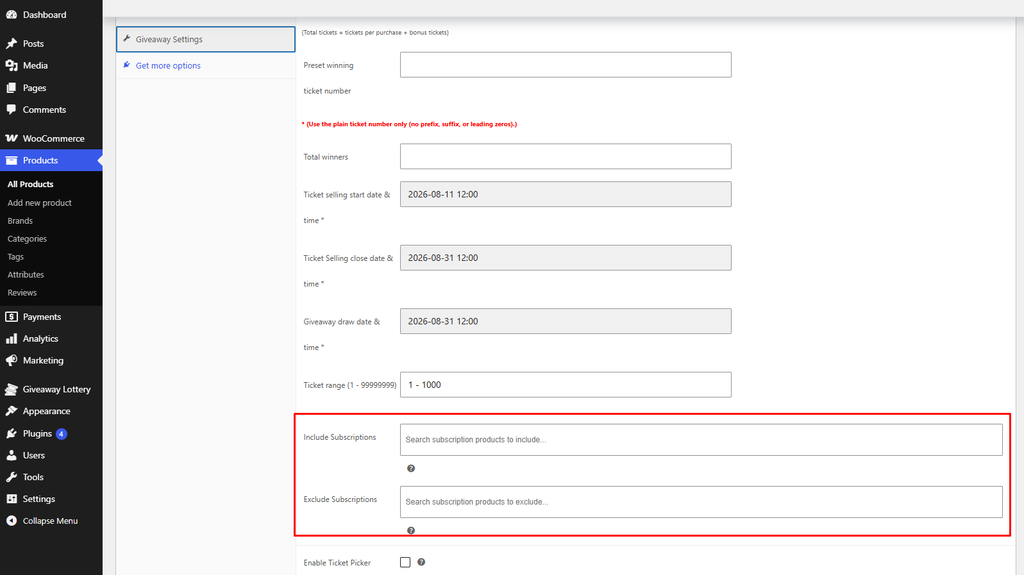
Ticket range must be large enough. When you publish/update the giveaway, the addon checks that your ticket range pool can cover every eligible subscriber’s tickets. If it can’t, the save is blocked with a message like “You must need N tickets to cover all eligible subscriptions… Please update the Ticket range field and save again.” Increase the Ticket range and save again.
Part C — Automatic Entry of Existing Subscribers
When you publish a giveaway (and the pool is big enough), the addon queues background ticket generation for all current active subscribers of the linked products. You’ll see admin notices such as “Background ticket generation queued for N subscriptions” and, once finished, “Generated X tickets across Y subscriptions.” Large batches are processed in chunks so the save doesn’t time out.
How Recurring Tickets Are Counted
The base amount per quantity is Allocated + Bonus.
- Without Accumulation: tickets = base × quantity, generated once at purchase. Renewals do not add new tickets.
- With Accumulation: tickets = base × period number × quantity, capped at Max Cap if set. On each renewal the existing tickets are topped up to the new total.
Tickets are only generated for giveaways that are still open and whose draw date is not after the subscriber’s next payment date. Winning ticket numbers follow your core Giveaway Lottery setting (sequential or random).
Ticket Generation & Lifecycle
| Event | Result |
| Subscription becomes active / pending-cancel | Tickets generated for matching open giveaways |
| Any subscription payment completes | Tickets generated (covers already-active subscriptions) |
| Renewal payment completes | Renewal tickets generated (or withdrawn tickets restored) |
| New linked giveaway published | Active subscribers entered automatically in the background |
| Leaves active / pending-cancel (cancelled, expired, on-hold) | Tickets for still-open giveaways withdrawn (closed giveaways keep their tickets) |
| Reactivated | Withdrawn tickets restored |
Note: pending-cancel subscriptions keep their tickets (they still count as active until the period ends).
The Subscription Tickets Admin Page
This add-on adds a dedicated per-giveaway management screen.
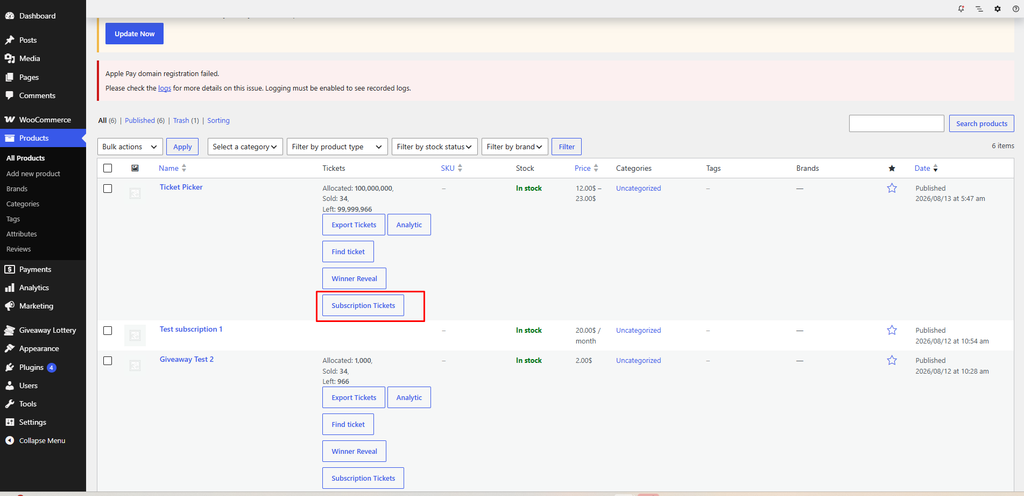
- Open it from the Subscription Tickets button on a giveaway in the Products list, or from the Giveaway Lottery → Analytics page for that product.
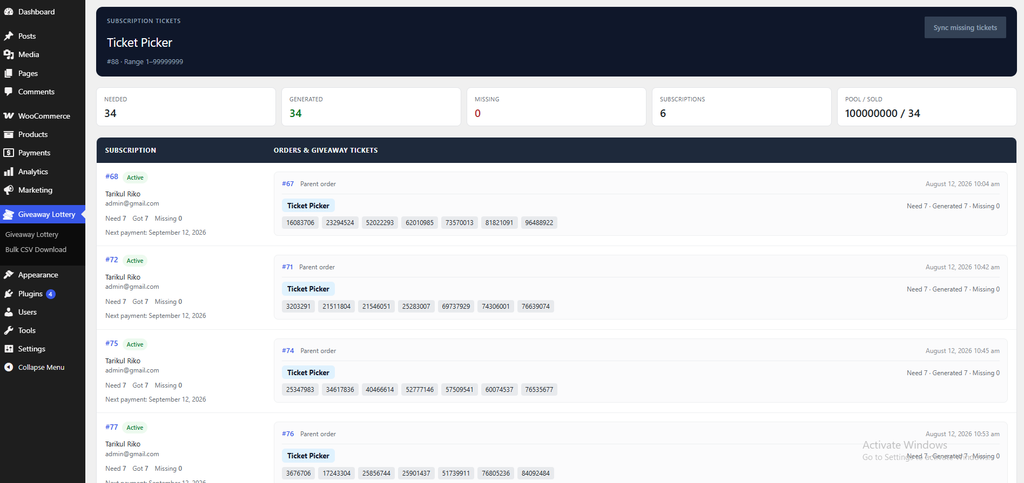
- The page shows metric chips: Needed, Generated, Missing, Subscriptions, and Pool / Sold.
- Below is a table of every eligible subscription with its related orders and the exact giveaway ticket numbers issued on each.
- If any tickets are missing (for example, subscriptions that existed before you linked them, or a pool that was too small earlier), click Sync missing tickets to generate them for all valid subscriptions at once. You’ll get a “Synced X ticket(s) across Y subscription(s)” confirmation.
What the Customer Sees
Ticket numbers appear under the subscription line item — on the thank-you page, the order details, and My Account — grouped by each giveaway product’s name.
Notes
- This addon sends no emails of its own, and it intentionally suppresses the core per-ticket email while generating subscription tickets, so subscribers aren’t flooded with messages on every renewal or bulk sync.
- There are no shortcodes — everything is automatic based on the subscription lifecycle and the Subscription Tickets page.
Pro tip: Use Accumulation with a sensible Max Cap to reward loyalty — long-term subscribers get more entries each cycle, but the cap keeps a single subscriber from dominating the odds. After linking subscriptions to a live giveaway, open the Subscription Tickets page and hit Sync missing tickets to backfill anyone who subscribed earlier.